
ScanMint
Photograph the paper, ScanMint figures out what to do with it.
ScanMint finds documents inside imperfect photographs, straightens and cleans them, then learns what it's looking at. What started as a computer-vision experiment became an attempt to make paperwork feel a little less like paperwork.
Overview
ScanMint takes a photo of a document from any angle, finds the document boundary, corrects the perspective and tells you what kind of document it is. It works on handwritten notes, printed pages, invoices and forms. It runs on a phone browser, and everything you do works signed out.
The version on this page is v0.16 of the product. The v1.0 that shipped for CSCI435 was simpler in every dimension. I kept building it because the interesting engineering problems only showed up after the coursework version was already "done".
What it does
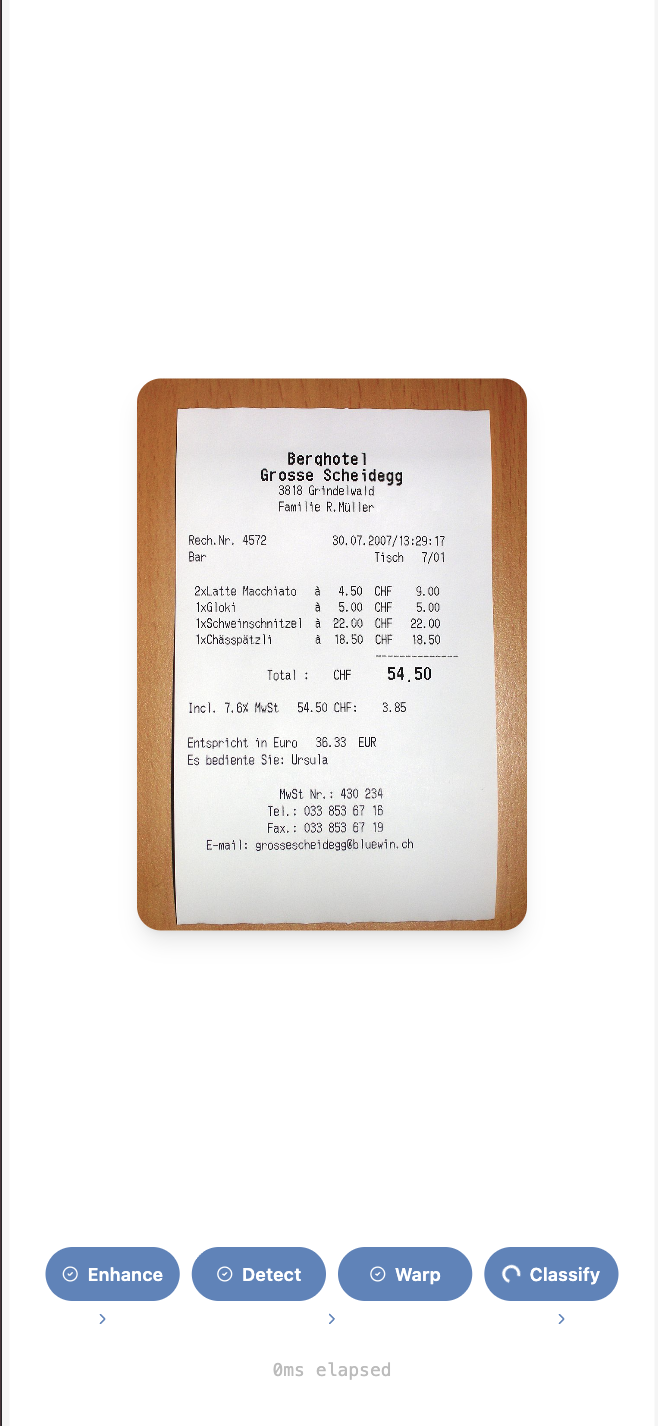
- Scan. Detects the document boundary in a photo using a five-pass edge-detection cascade, corrects the perspective and cleans up the result.
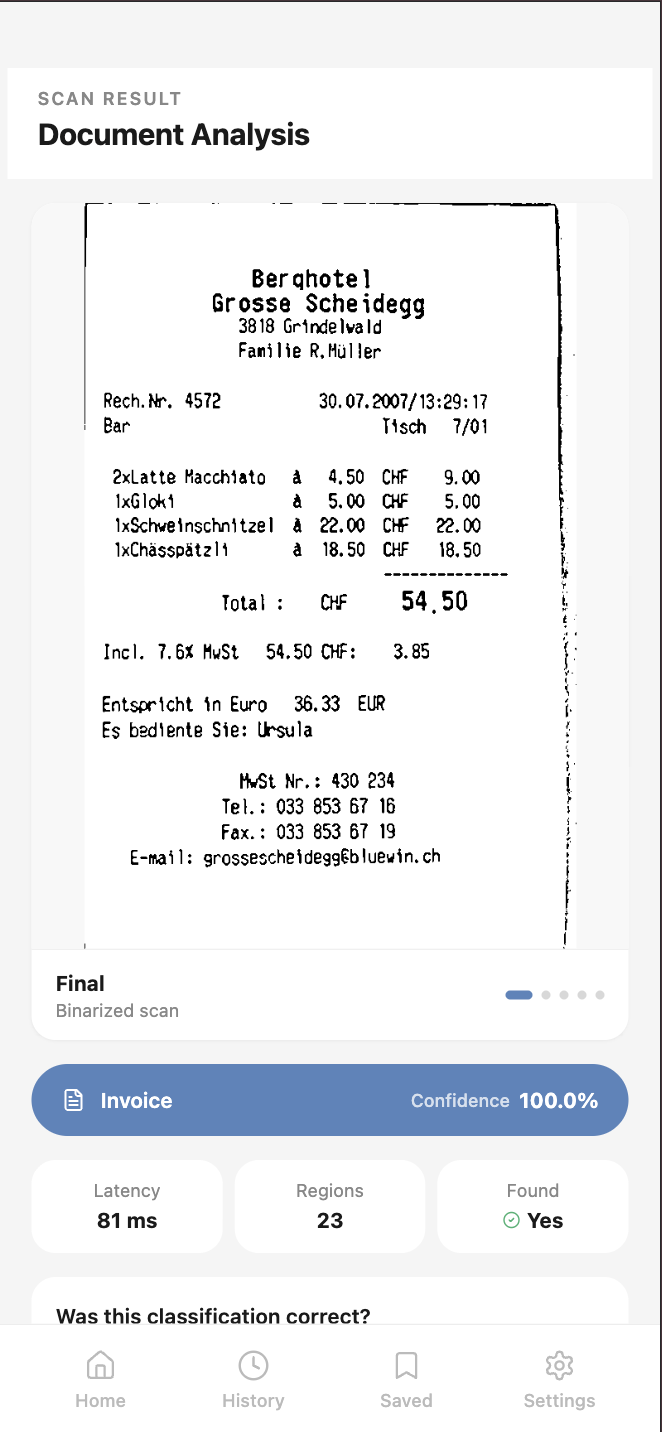
- Classify. Runs the corrected image through a MobileNetV2 model to label it as handwritten, invoice, form or printed page.
- Organise. Stores scans locally, lets you file them into folders, filter by category and download to device.
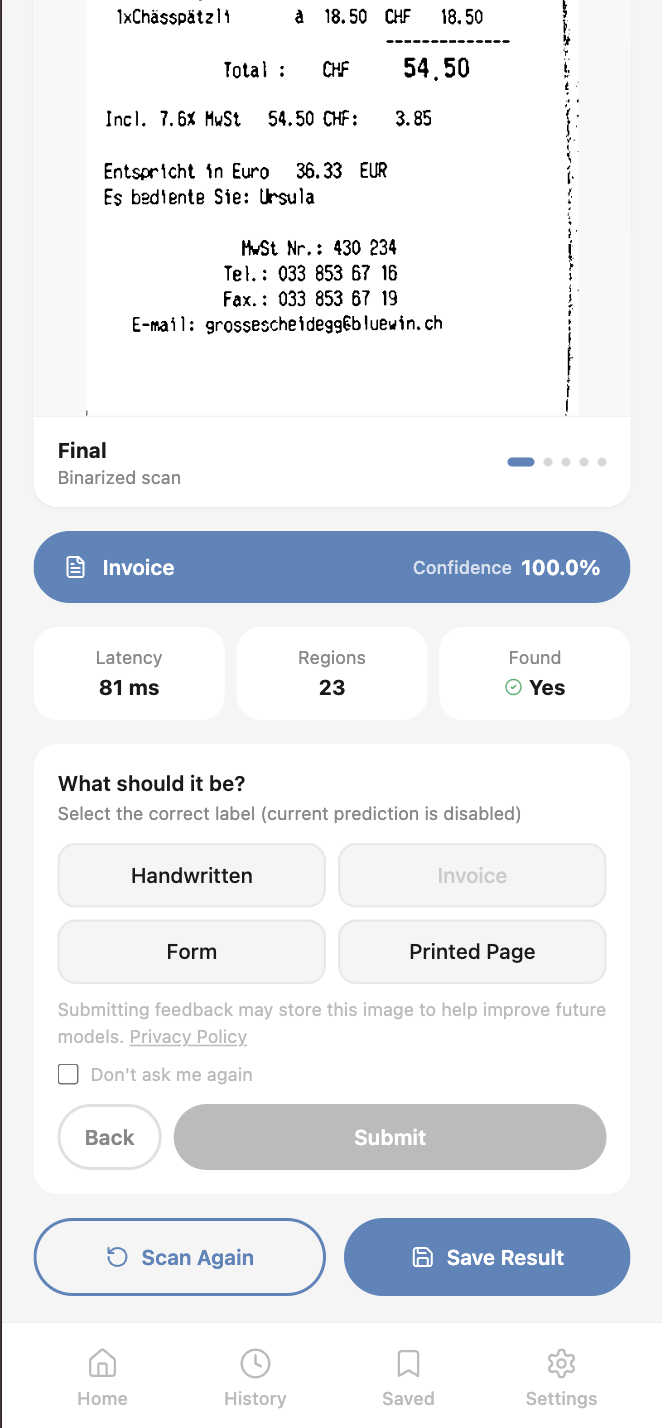
- Feedback. Asks you to confirm or correct the prediction. Corrections flow to Supabase for future retraining.
Product screens
What it looks like on a phone. Home, the pipeline running, the result.

The CV pipeline
Detecting a document boundary in a photo is one of those problems that looks solved until you try to use it on a real phone photo. Clean scanner output is trivial. A form on a wooden table with the corner of a laptop in frame is not.
ScanMint's boundary detector runs a five-pass cascade. Canny edges with varying thresholds, HSV filtering, Otsu binarisation, contour scoring and a final edge-support validation that rejects quads where any side lacks real edges. Each pass exists because an earlier version failed on a specific class of photo. The pipeline evolved reactively; a v2 would probably collapse it into a scoring model, but the cascade catches edge cases the ML-based approaches we tried didn't.
Once a boundary is found, a perspective transform maps the quad to a rectangle, adaptive binarisation cleans the result and text region segmentation identifies where the content sits on the page.
Removed the deskew step. Perspective correction was already producing near-straight output.
The classifier
The classifier is a fine-tuned MobileNetV2 with four output classes: handwritten, invoice, form, printed page. The training pipeline uses augmentation tuned for real-world handheld photos: random flips, rotation, colour jitter, affine shear, Gaussian blur and random erasing. The goal was to survive the mess that phone photos introduce, not to achieve state-of-the-art accuracy on clean scans.
MobileNetV2 was chosen for size and inference speed. It runs comfortably on modest hardware, which matters for a product that could eventually deploy on-device.
The training data comes from two public Kaggle datasets, cited in the repo. Both are non-commercial licences, which is why the trained weights aren't in the public model registry and only ship for academic use.
import torch
import torch.nn as nn
from torchvision import transforms, models
from PIL import Image
import numpy as np

CLASSES = ['handwritten', 'invoice', 'form', 'printed_page']

# preprocessing pipeline that every image goes through before hitting the model
# resize to 224x224 (what mobilenet expects), convert to tensor, then normalize
# the mean/std values are the imagenet ones, has to match exactly what was used during training
_transform = transforms.Compose([
    transforms.Resize((224, 224)),
    transforms.ToTensor(),
    transforms.Normalize([0.485, 0.456, 0.406], [0.229, 0.224, 0.225])
])

_model = None

# loads the model from disk the first time its needed, then keeps it in memory
# avoids reloading the weights on every request which would be super slow
def _get_model(model_path='models/document_classifier_v2.pt'):
    global _model
    if _model is None:
        m = models.mobilenet_v2(weights=None)
        m.classifier = nn.Sequential(
            nn.Dropout(p=0.3),
            nn.Linear(m.last_channel, len(CLASSES))
        )
        m.load_state_dict(torch.load(model_path, map_location='cpu'))
        m.eval()
        _model = m
        print(f'[classification_core] model loaded from {model_path}')
    return _model

# converts whatever image thingy gets passed in into a pil RGB image that the transform can handle
# supports pil images, numpy arrays (rgb or bgr) and file paths
# the bgr flip is needed bc opencv loads images in bgr order but pil expects rgb
def _to_pil(image):
    if isinstance(image, Image.Image):
        return image.convert('RGB')
    if isinstance(image, np.ndarray):
        if image.ndim == 3 and image.shape[2] == 3:
            image = image[:, :, ::-1]   # opencv loads bgr, pil expects rgb, flip channel order
        return Image.fromarray(image.astype('uint8')).convert('RGB')
    if isinstance(image, str):
        return Image.open(image).convert('RGB')
    raise TypeError(f'unsupported image type: {type(image)}')

# the main function, runs the image through the model and returns the predicted class and confidence
# torch.no_grad() stops it from computing gradients which we dont need for inference, saves memory
def classify_document(image, model_path='models/document_classifier_v2.pt'):
    """runs inference, returns (class_name, confidence) e.g. ('invoice', 0.97)"""
    model  = _get_model(model_path)
    tensor = _transform(_to_pil(image)).unsqueeze(0)
    with torch.no_grad():
        probs      = torch.softmax(model(tensor), dim=1)
        conf, pred = probs.max(1)
return CLASSES[pred.item()], round(conf.item(), 4)- handwritten
- invoice
- form
- printed_page
Weights ship as document_classifier_v2.pt, gitignored and academic-use only.
The feedback loop
After each classification, the user is asked to confirm or correct the predicted label. Corrections are stored in Supabase with the warped image attached, keyed to a user ID if signed in and anonymous otherwise. Local storage keeps a mirror as backup.
An admin script exports misclassified images for retraining. The retraining loop itself is manual right now, one of the honest gaps in the current version. But the collection infrastructure is in place, which is the part that would have been hardest to bolt on after the fact.
This piece is what makes ScanMint feel like a service and not a demo. A classifier that can't learn from its mistakes ages badly; one that quietly collects corrections gets better while nobody's watching.
Design decisions
A few calls that shaped the product more than the model did.
Auth is optional and guest-first. You can scan, classify, save, organise and give feedback without ever signing in. When you sign in, your user ID attaches to future feedback rows and that's it. Friction kills utility in scanning apps. Anyone who's tried to use a paywalled scanner while standing at a photocopier knows why.
Feedback storage over post-hoc retraining. We prioritised infrastructure to collect corrections over automating the retraining loop. Retraining is a script run; correction data is a system. Building the system first meant that when we do automate retraining, the data will be there. The reverse order would have left us with no data to train on.
MobileNetV2 over a bigger model. ImageNet-scale accuracy wasn't the point. Predictable inference on modest hardware was. Bigger models would have won on paper and lost in practice.
- v0.16 — Edge support validation
- v0.15 — Feedback image storage
- v0.14 — Removed deskew step
- v0.13 — Upload security hardening
- v0.12 — Optional Supabase Auth
- v0.11 — Feedback prompt
- ...
- v0.1 — Initial scaffold
Tech stack
Frontend. Next.js 15, TypeScript, Tailwind.
Backend. FastAPI, OpenCV, Python 3.9+.
Classifier. PyTorch, MobileNetV2, custom training loop.
Data. Supabase (Postgres, Auth, Storage).
Deployment. Docker for the backend services, gitignored model weights, environment-driven configuration.
Results
Sixteen versions in, four document classes, five passes to find a page.
What I'd do differently
Three things a v2 would fix.
Collapse the detection cascade into a learned scorer. Five passes evolved reactively as edge cases surfaced. It works, but it's harder to reason about than a single model trained on labelled boundaries. A v2 would try that swap.
Automate the retraining loop. Feedback data collects itself; retraining is still a script I run manually. The gap between "we have data" and "the model gets better without me" is where the interesting product work is.
Separate scan UI from library management. The frontend accumulated some drift as scope grew. Scanning is a fast, focused, one-shot interaction. Library management is a slower, browsy one. Trying to serve both in one UI made both feel compromised.

